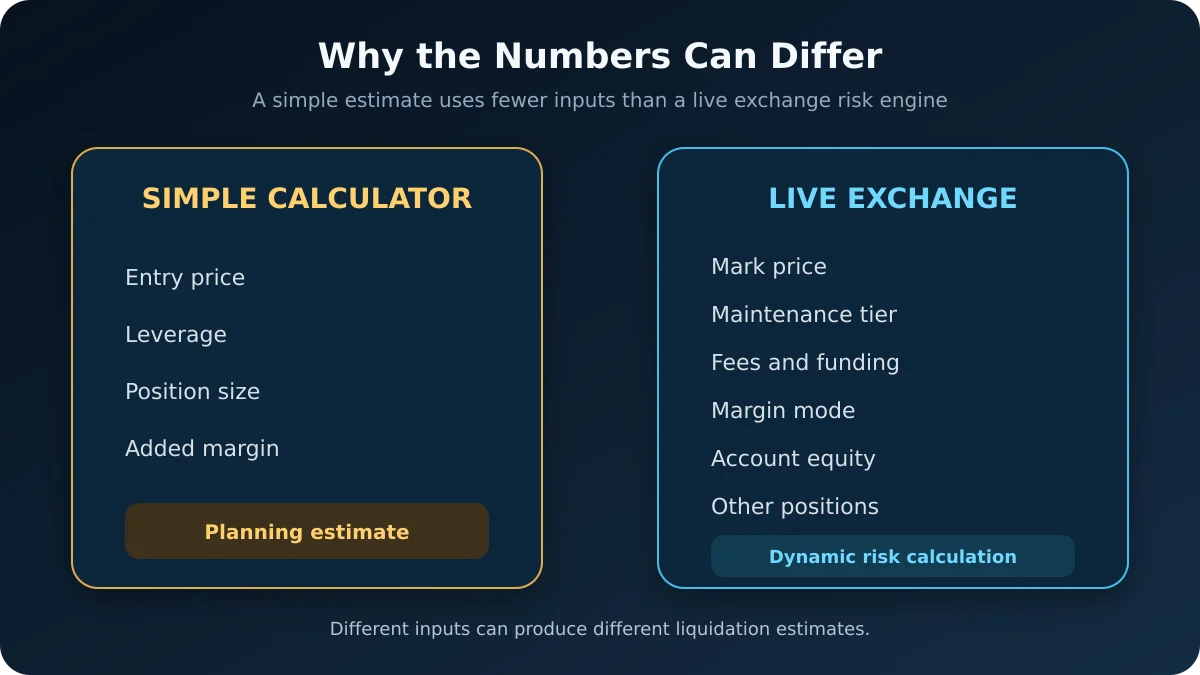
Your exchange liquidation price can differ from a calculator because most calculators provide a simplified estimate, while the exchange uses its live margin engine. The exchange may include mark price, maintenance-margin tiers, fees, funding, margin mode, account equity and other positions.
A small difference does not automatically mean either number is wrong. It usually means the two calculations are using different inputs or assumptions.
Quick Answer
The liquidation price shown by the exchange should be treated as the operational reference for that position. A third-party calculator is useful for planning, but it may not reproduce every rule in the exchange’s risk engine.
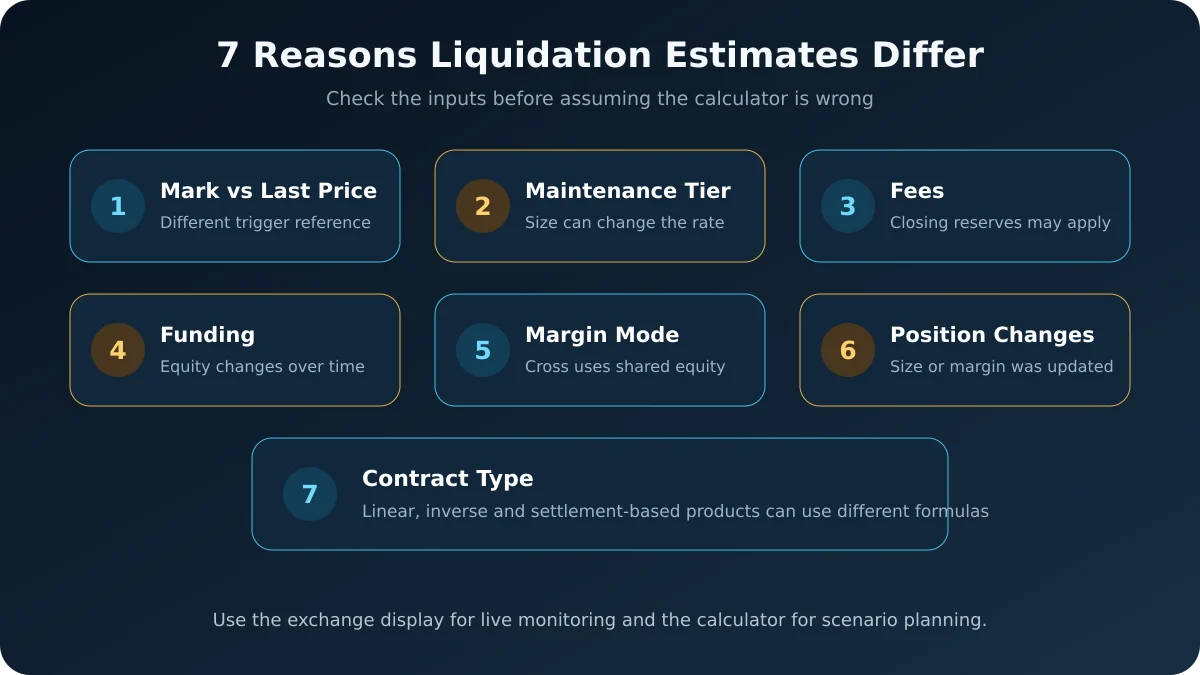
The most common reasons for a difference are:
- The calculator uses last price while the exchange uses mark price.
- The maintenance-margin rate or risk tier is different.
- Closing or liquidation fees are included differently.
- Funding payments have changed position or account equity.
- Cross and isolated margin use different equity inputs.
- Position size, added margin or other positions changed.
- The calculator uses the wrong contract type or settlement model.
A Simple Example
Suppose a trader enters a BTCUSDT long position and a calculator estimates liquidation at $43,200. The exchange displays $43,560.
That $360 gap could come from several small differences working together:
- The calculator assumes a flat maintenance-margin rate.
- The exchange applies the position’s current risk tier.
- The exchange reserves an estimated closing or liquidation fee.
- Funding has already been deducted from available equity.
- The exchange uses mark price as the liquidation trigger.
These numbers are only a teaching example. They are not a prediction or a universal exchange formula.
A Calculator and an Exchange Are Solving Different Problems
A basic calculator may ask for only:
- Entry price
- Position direction
- Leverage
- Position size
- Added margin
The exchange has access to a much larger set of live inputs. Its system must decide whether the position or account still satisfies the current maintenance-margin requirement.
A simplified way to think about the trigger is:
Liquidation risk increases when margin equity approaches the required maintenance margin and applicable fees.
There is no single formula that applies unchanged to every exchange, contract and margin mode.
1. Mark Price vs Last Traded Price
This is one of the most important differences.
Many derivatives exchanges use mark price, not the most recent trade price, to trigger liquidation. Mark price is generally derived from an index and a basis or premium calculation designed to reduce the effect of temporary order-book spikes.
The last traded price can therefore be above or below the mark price. If a calculator uses the last price—or assumes that the chart price and trigger price are identical—its estimated liquidation distance may not match the exchange.
Bybit states that its perpetual-contract liquidation is triggered when mark price reaches the liquidation price. OKX also states that its liquidation price is based on mark price.
2. Maintenance Margin and Risk Tiers
Initial margin is the amount generally required to open a leveraged position. Maintenance margin is the minimum level required to keep it open.
Simple calculators sometimes use one maintenance-margin percentage for every position. Exchanges may instead use tiered requirements. When position value increases, the position can enter a different risk tier with a higher maintenance-margin requirement.
When comparing results, confirm that the calculator’s maintenance-margin rate matches the exact symbol, contract and current position tier.
3. Fees and Liquidation Reserves
An exchange may include estimated closing fees, taker fees or liquidation-related fees in its margin calculations. A simplified calculator may ignore them or apply a generic fee.
Even a relatively small fee assumption can move the displayed liquidation price, especially when leverage is high and the available buffer is narrow.
Do not assume the entire gap is a calculation error until you have checked whether both tools include the same fee rate.
4. Funding and Other Balance Changes
Funding payments can reduce or increase position or account equity, depending on the platform and margin mode. If a funding payment is deducted while the position remains open, the live liquidation estimate may move.
A calculator usually starts from the values entered manually. It does not automatically know that funding, realized PnL or another balance adjustment occurred after the position was opened.
For more detail, see Is Funding Fee Calculated on Margin or Position Size?.
5. Isolated Margin vs Cross Margin
In isolated margin, the position normally has a defined amount of collateral assigned to it. A calculator can often approximate this setup if the correct added margin and maintenance requirement are entered.
Cross margin is more complex. The exchange may use shared account equity, unrealized PnL and the margin requirements of other positions and orders. As those values change, the estimated liquidation price can move even when the selected leverage on one position remains unchanged.
Kraken describes its displayed liquidation price as an estimate that can change with account balance and exposure. OKX likewise notes that its estimated liquidation price can change continuously.
6. Position Size or Margin Changed
The exchange recalculates risk after events such as:
- Adding or removing position margin
- Increasing or partially closing the position
- A pending order being filled
- Changing leverage
- Realizing profit or loss
- Opening another cross-margin position
If the calculator still contains the original values, its result will no longer represent the live position.
Remember that adding margin is not the same as adding to the position. One changes collateral; the other changes quantity and average entry price. See Adding Margin vs Averaging Down in Crypto Futures.
7. Contract Type and Formula Direction
Linear USDT-settled contracts, inverse crypto-settled contracts and settlement-based products do not necessarily use the same formulas.
Common input mistakes include:
- Selecting a linear calculator for an inverse contract
- Entering quantity in coins when the calculator expects contracts
- Using position margin where the tool expects account balance
- Treating selected leverage as current effective leverage
- Entering the wrong long or short direction
A calculator can produce a mathematically correct result for the wrong product. Always match the contract type before comparing numbers.
What Usually Changes the Exchange Estimate?
| Event | Can liquidation estimate change? | Main reason |
|---|---|---|
| Mark price moves | The trigger distance changes | Liquidation commonly uses mark price |
| Add isolated margin | Usually yes | More collateral supports the position |
| Increase position size | Usually yes | Exposure and maintenance requirement change |
| Funding is deducted | Can change | Position or account equity changes |
| Another cross position loses money | Can change | Shared equity decreases |
| Risk tier changes | Usually yes | Maintenance-margin requirement changes |
| Last price moves alone | Not necessarily | Last price may not be the liquidation trigger |
How to Compare the Two Numbers Correctly
Use this checklist before deciding that the calculator is inaccurate:
- Select the correct exchange or custom formula if available.
- Match the exact contract: linear, inverse, perpetual or expiry.
- Confirm long or short direction.
- Enter the current position quantity and average entry price.
- Enter the actual position margin, including manually added margin.
- Check the current maintenance-margin tier.
- Match the exchange’s fee assumptions.
- Confirm whether the position uses isolated or cross margin.
- Use mark price when the calculator supports it.
- Recalculate after funding, partial fills or balance changes.
If the tool cannot model the exchange’s margin system, label the output as a planning estimate and leave a safety buffer rather than treating the result as an exact trigger.
Common Mistakes
Treating the Calculator as an Exchange Guarantee
A calculator does not control liquidation. The exchange’s live risk engine and published rules determine when action is taken.
Watching Only the Candlestick Price
The visible chart may default to last traded price. If liquidation uses mark price, monitor the mark-price display and maintenance-margin ratio as well.
Ignoring Position Tiers
A formula that worked for a small position may become less accurate after the position enters a higher maintenance-margin tier.
Forgetting Added Margin
If you transferred additional collateral after opening the position, the original calculator inputs are outdated. See Does Adding Margin Change Your Entry Price?.
Using an Exact Number Without a Buffer
Liquidation estimates can move. Funding, fees, cross-margin equity and filled orders may change the live result before price reaches the original estimate.
Frequently Asked Questions
Is the exchange liquidation price always exact?
It is the most relevant live estimate for that platform, but some exchanges explicitly describe it as dynamic or for reference. Monitor the maintenance-margin ratio and current account state as well.
Why did my liquidation price change without changing leverage?
Possible causes include funding, added or removed margin, cross-margin PnL, another filled order, a risk-tier change or a balance adjustment. Selected leverage is only one input.
Can mark price liquidate me before the last price reaches my liquidation price?
If the exchange uses mark price as the trigger, yes. The mark price can temporarily differ from the last traded price shown on the main chart.
Why is the calculator farther from liquidation than the exchange?
The calculator may be excluding maintenance-margin tiers, fees, funding or account-level effects. It may also be using the wrong contract model.
Should I manually change the calculator result to match the exchange?
Do not alter the output arbitrarily. First match the inputs and assumptions. If the calculator cannot reproduce the platform’s rules, use it as a simplified planning tool and rely on the exchange for live position monitoring.
Final Takeaway
A liquidation calculator is best used to explore scenarios before entering or modifying a position. The exchange uses a live risk engine with contract-specific rules and changing account data, so its displayed liquidation price may differ from a simplified estimate.
Compare mark price, maintenance-margin tier, fees, funding, margin mode, position size and account equity. Most importantly, do not manage a leveraged position around one exact calculator number. The liquidation estimate can change as the position and account change.
Official Sources
- Bybit: Mark Price for Perpetual and Expiry Contracts
- OKX: How Liquidation Works in Futures Trading
- Kraken: Liquidation FAQ for Derivatives
This article is for educational purposes only and does not provide investment, legal, tax or financial advice. Crypto derivatives involve substantial risk, including the possibility of liquidation.